Introduction
This trigonometry calculator mistake is one of the most common reasons students get the correct method but the wrong final answer. In Secondary Maths, many trigonometry questions become much easier once students realise that the calculator must be in the correct angle mode. If your answer for \(\sin 30^\circ\) looks strange, this trigonometry calculator mistake may be the real problem.
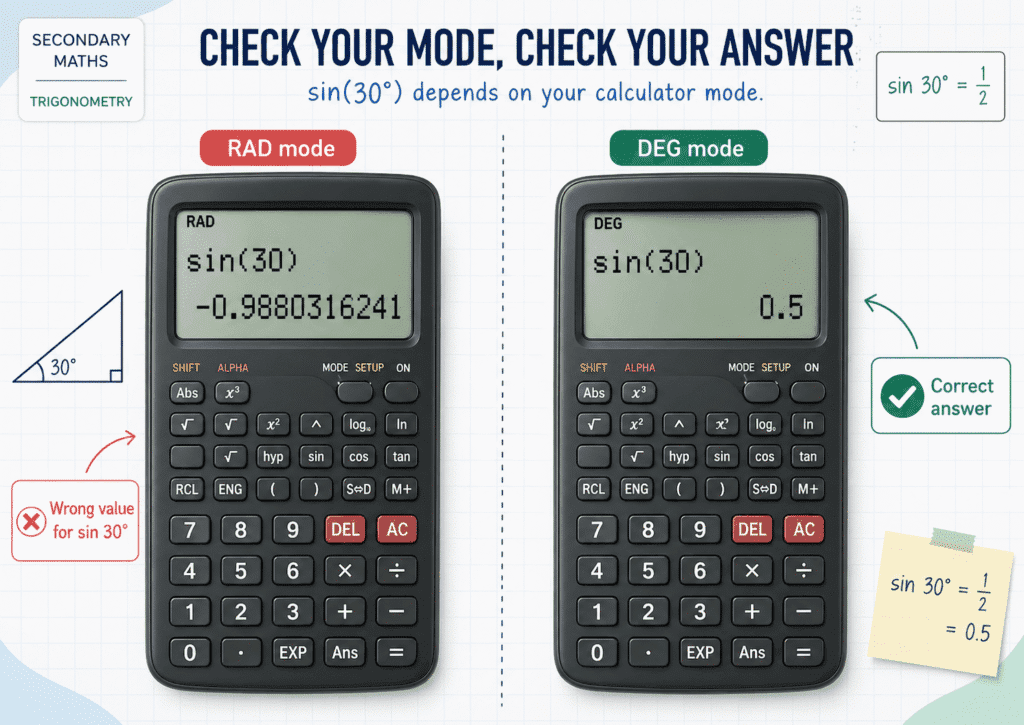
The Question / Scenario Explanation
Source: The #1 Calculator Mistake Students Make in Trigonometry
Scenario shown in the screenshots:
A student keys in \(\sin(30)\) and gets a wrong-looking answer because the calculator is in radian mode instead of degree mode.
The screenshots also show the calculator being changed from:
- 1: Degree
- 2: Radian
- 3: Gradian
After switching to Degree mode, \(\sin(30^\circ)\) gives the correct answer:
\(\frac{1}{2}\)
Step-by-Step Solution / Explanation
Step 1: Spot the wrong calculator answer
In this trigonometry calculator mistake, a student enters \(\sin(30)\) and the calculator shows a value close to:
\(-0.9880316241\)
This is clearly not the usual answer students expect for \(\sin 30^\circ\).
Step 2: Understand why the answer is wrong
The issue is not the trigonometry concept. The problem is the calculator mode.
If the calculator is in radian mode, it interprets \(30\) as 30 radians, not \(30^\circ\).
That is why the calculator gives a strange value instead of the expected answer.
So this trigonometry calculator mistake happens when students forget to check whether the calculator is set to Degree or Radian.
Step 3: Change the calculator to Degree mode
To fix the problem, open the calculator settings and choose:
1: Degree
On many calculators, this is done by opening the setup menu and selecting the angle unit.
Once the calculator is in Degree mode, angle questions involving degrees will display correctly.
Step 4: Try the trigonometry question again
Now re-enter:
\(\sin(30^\circ)\)
This time, the calculator gives:
\(\frac{1}{2}\)
or
\(0.5\)
This is the correct answer.
Step 5: Final takeaway
The correct Maths method may be fine, but if the calculator is in the wrong mode, the final answer will still be wrong.
✅ Final Answer / Key Lesson: Always check that your calculator is in Degree mode before doing trigonometry questions with angles in degrees.
Key Concepts Students Must Know
- A trigonometry calculator mistake often happens because of the wrong angle mode, not because of weak Maths understanding.
- There are different angle units: Degree, Radian, and Gradian.
- Most Secondary Maths trigonometry questions use degrees, such as \(30^\circ\), \(45^\circ\), and \(60^\circ\).
- \(\sin 30^\circ = \frac{1}{2}\), but a calculator in radian mode will not show this answer if you key in \(30\).
- Always match the calculator mode to the angle unit given in the question.
Exam Tips / Common Mistakes
Exam Tips
- Before every trigonometry question, check the top of your calculator screen or the setup mode.
- If the question uses degree signs like \(30^\circ\), \(45^\circ\), or \(120^\circ\), your calculator should normally be in Degree mode.
- Memorise a quick check: \(\sin 30^\circ = 0.5\). If your calculator does not show that, the mode is probably wrong.
- This trigonometry calculator mistake can be prevented in just a few seconds with one quick settings check.
Common Mistakes
- Entering \(\sin(30)\) while the calculator is still in radian mode.
- Assuming a strange calculator value means the trigonometry rule is wrong.
- Changing the method instead of checking the calculator setting first.
- Forgetting that Degree mode and Radian mode give different answers for the same number input.
Parent Insight
This trigonometry calculator mistake is a good example of how students can lose marks even when they understand the topic. Sometimes the issue is not content knowledge, but exam habits and calculator handling. Teaching children to check angle mode before starting a trigonometry question can prevent many avoidable mistakes in tests and exams.
Conclusion
This trigonometry calculator mistake happens when students do degree-based angle questions using a calculator that is set to radian mode. If \(\sin 30^\circ\) does not give \(\frac{1}{2}\), the first thing to check is the angle unit. Switch the calculator to Degree mode, try again, and the answer should come out correctly.
Visit our Secondary Maths homepage: Click Here…
Read more Secondary Maths worked examples here: Click Here…
Start here (limited slots weekly):
Free Trial: Click Here…
Enrol: Click Here…
Explore our main tuition brand approach here: Click Here… .